> ## Documentation Index
> Fetch the complete documentation index at: https://docs.autocalls.ai/llms.txt
> Use this file to discover all available pages before exploring further.
# User Limits Management
> Configure individual user limits and restrictions for your white label platform users
Manage individual user limits and restrictions beyond the default plan limits. This allows you to customize specific users' access without changing their plan.
## Overview
User limits provide granular control over individual users on your white label platform. You can override plan limits for specific users, giving them more or less access than their plan normally allows.
## Accessing User Settings
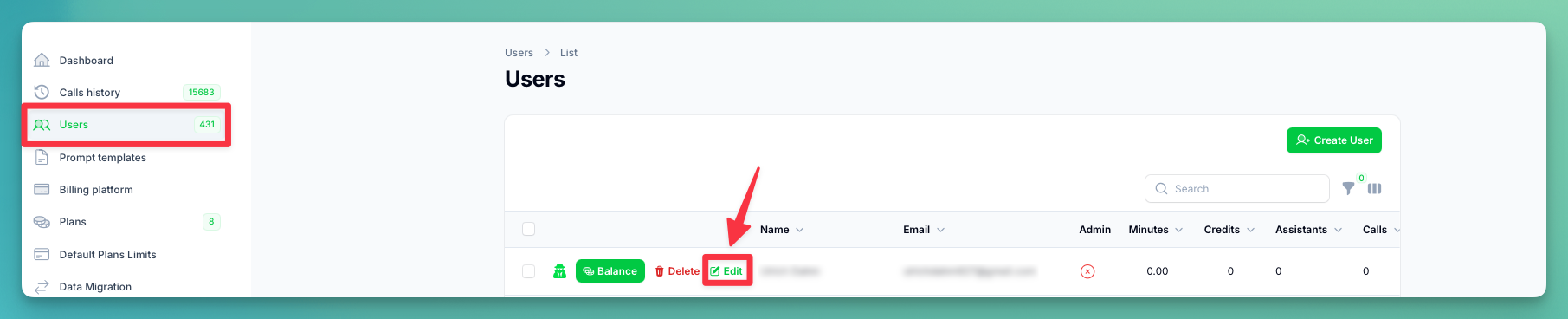 1. Go to the **Users** table in your administration panel
2. Click the **Edit** button on any user row to open their profile
## User Information & Access
1. Go to the **Users** table in your administration panel
2. Click the **Edit** button on any user row to open their profile
## User Information & Access
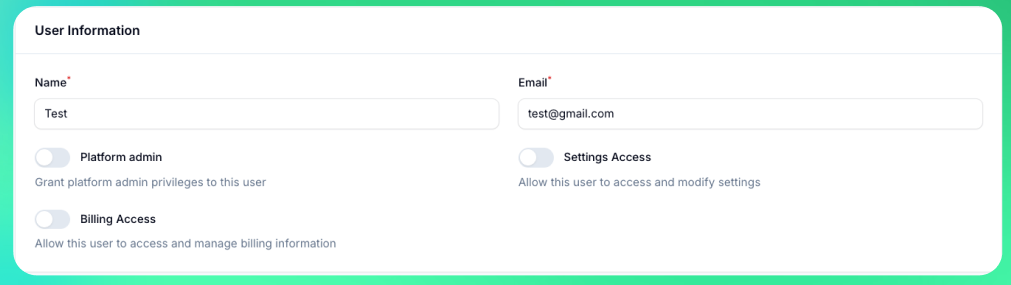 Manage basic user details and administration panel access permissions.
**Basic Information:**
* **Name** — User's display name
* **Email** — User's email address (used for login and notifications)
**Administration Panel Access:**
These permissions grant access to the **Administration Panel** — the tenant management area where you configure your white label platform. Only enable these for team members who need to manage the platform itself, not for regular end users.
* **Platform Admin** — Full administrative access to the administration panel. Can manage users, configure all settings, and access all resources. Use for trusted administrators who need complete control.
* **Settings Access** — Can access and modify the administration panel settings page (branding, appearance, email templates, etc.) but cannot manage other users. Use for team members who need to configure the platform without user management.
* **Billing Access** — Can access the billing dashboard, manage payment methods, view invoices, and update billing information. Use for finance team members or accounting staff.
These permissions only apply to tenant users. The tenant owner always has full access by default.
## Custom User Limits
Enable **"Custom Limits"** to override plan defaults for this specific user.
Manage basic user details and administration panel access permissions.
**Basic Information:**
* **Name** — User's display name
* **Email** — User's email address (used for login and notifications)
**Administration Panel Access:**
These permissions grant access to the **Administration Panel** — the tenant management area where you configure your white label platform. Only enable these for team members who need to manage the platform itself, not for regular end users.
* **Platform Admin** — Full administrative access to the administration panel. Can manage users, configure all settings, and access all resources. Use for trusted administrators who need complete control.
* **Settings Access** — Can access and modify the administration panel settings page (branding, appearance, email templates, etc.) but cannot manage other users. Use for team members who need to configure the platform without user management.
* **Billing Access** — Can access the billing dashboard, manage payment methods, view invoices, and update billing information. Use for finance team members or accounting staff.
These permissions only apply to tenant users. The tenant owner always has full access by default.
## Custom User Limits
Enable **"Custom Limits"** to override plan defaults for this specific user.
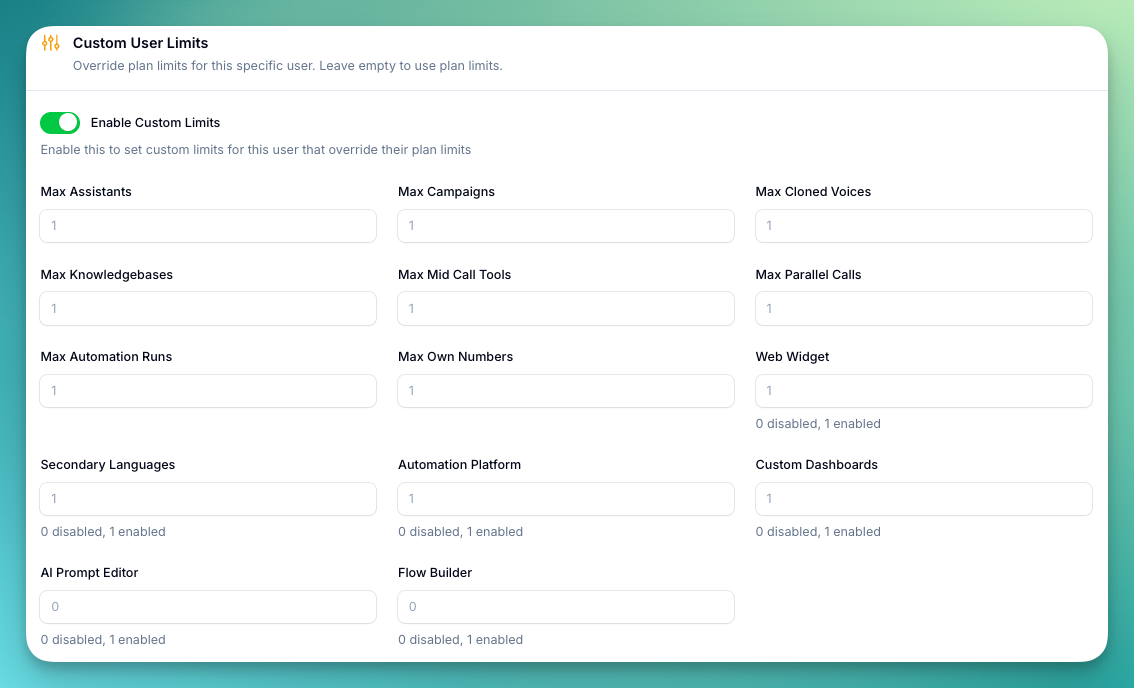 ### Count Limits
Numerical restrictions on resource usage. Set **-1** for unlimited, **0** for disabled, or a positive number for a specific limit.
| Limit | Description |
| ----------------------- | --------------------------------------------------- |
| **Max Assistants** | Maximum number of AI assistants the user can create |
| **Max Campaigns** | Maximum number of outbound campaigns |
| **Max Cloned Voices** | Maximum number of custom voice clones |
| **Max Knowledgebases** | Maximum number of knowledge bases |
| **Max Mid Call Tools** | Maximum custom mid-call tools |
| **Max Parallel Calls** | Maximum simultaneous calls |
| **Max Automation Runs** | Monthly automation platform executions |
| **Max Own Numbers** | Maximum phone numbers user can add (SIP/Caller ID) |
### Boolean Limits
| Feature | Description |
| ----------------------- | --------------------------------------------- |
| **Web Widget** | Access to embeddable web widget functionality |
| **Secondary Languages** | Access to multi-language assistant support |
| **Automation Platform** | Access to no-code automation workflows |
| **Custom Dashboards** | Access to create and manage custom dashboards |
| **AI Prompt Editor** | Access to the AI prompt editor |
| **Flow Builder** | Access to the flow builder |
## Custom User Appearance
### Count Limits
Numerical restrictions on resource usage. Set **-1** for unlimited, **0** for disabled, or a positive number for a specific limit.
| Limit | Description |
| ----------------------- | --------------------------------------------------- |
| **Max Assistants** | Maximum number of AI assistants the user can create |
| **Max Campaigns** | Maximum number of outbound campaigns |
| **Max Cloned Voices** | Maximum number of custom voice clones |
| **Max Knowledgebases** | Maximum number of knowledge bases |
| **Max Mid Call Tools** | Maximum custom mid-call tools |
| **Max Parallel Calls** | Maximum simultaneous calls |
| **Max Automation Runs** | Monthly automation platform executions |
| **Max Own Numbers** | Maximum phone numbers user can add (SIP/Caller ID) |
### Boolean Limits
| Feature | Description |
| ----------------------- | --------------------------------------------- |
| **Web Widget** | Access to embeddable web widget functionality |
| **Secondary Languages** | Access to multi-language assistant support |
| **Automation Platform** | Access to no-code automation workflows |
| **Custom Dashboards** | Access to create and manage custom dashboards |
| **AI Prompt Editor** | Access to the AI prompt editor |
| **Flow Builder** | Access to the flow builder |
## Custom User Appearance
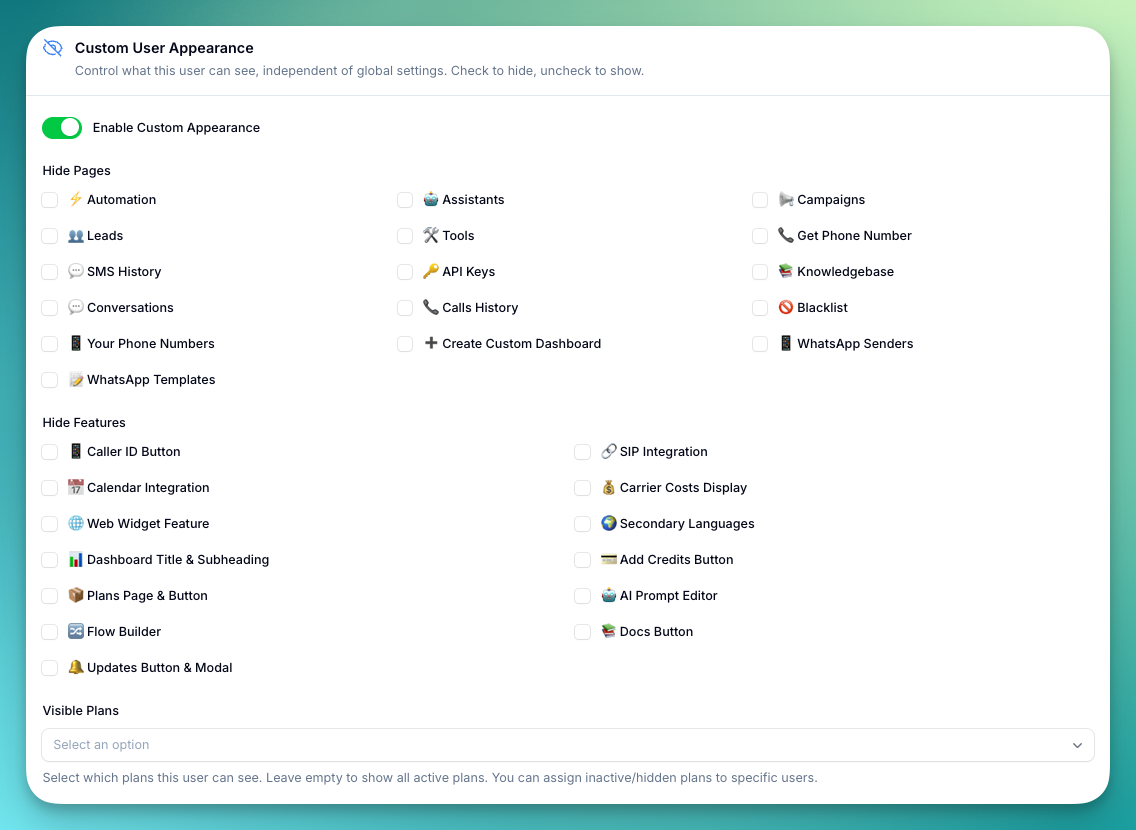 Customize what individual users can see and access on your platform, independent of your global appearance settings. Enable **"Custom Appearance"** to override global settings for this user.
Checkboxes start with your current global settings as defaults. Check a box to **hide** that page or feature from the user.
### Hide Pages
Customize what individual users can see and access on your platform, independent of your global appearance settings. Enable **"Custom Appearance"** to override global settings for this user.
Checkboxes start with your current global settings as defaults. Check a box to **hide** that page or feature from the user.
### Hide Pages
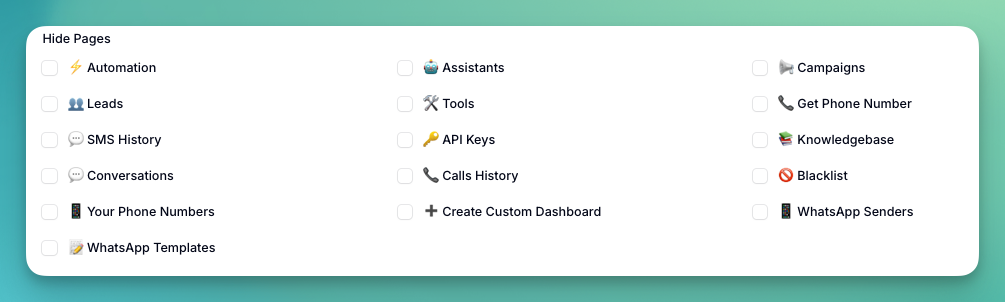 * Automation, Assistants, Campaigns, Leads, Tools
* Get Phone Number, SMS History, API Keys
* Knowledgebase, Conversations, Calls History
* Blacklist, Your Phone Numbers, Create Custom Dashboard
* WhatsApp Senders, WhatsApp Templates
### Hide Features
* Automation, Assistants, Campaigns, Leads, Tools
* Get Phone Number, SMS History, API Keys
* Knowledgebase, Conversations, Calls History
* Blacklist, Your Phone Numbers, Create Custom Dashboard
* WhatsApp Senders, WhatsApp Templates
### Hide Features
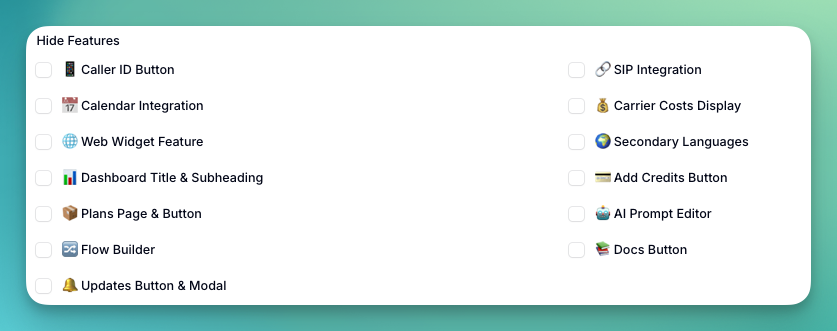 * Caller ID Button, SIP Integration
* Calendar Integration, Carrier Costs Display
* Web Widget, Secondary Languages, Dashboard Title & Subheading
* Add Credits Button, Plans Page & Button
* AI Prompt Editor, Flow Builder
* Docs Button, Updates Button & Modal
### Visible Plans
* Caller ID Button, SIP Integration
* Calendar Integration, Carrier Costs Display
* Web Widget, Secondary Languages, Dashboard Title & Subheading
* Add Credits Button, Plans Page & Button
* AI Prompt Editor, Flow Builder
* Docs Button, Updates Button & Modal
### Visible Plans
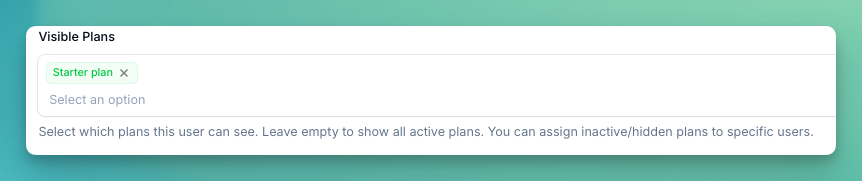 Restrict which plans the user can see. Select specific plans from the dropdown — leave empty to show all active plans. You can also assign inactive or hidden plans to specific users.
User appearance settings override global settings. If no custom setting exists for a feature, the global configuration applies.
Custom limits and appearance settings do not apply to the tenant owner.
## Manage Balance
Click the **Balance** button on any user row to open the balance management modal. This shows the current balances and lets you transfer minutes or credits.
Restrict which plans the user can see. Select specific plans from the dropdown — leave empty to show all active plans. You can also assign inactive or hidden plans to specific users.
User appearance settings override global settings. If no custom setting exists for a feature, the global configuration applies.
Custom limits and appearance settings do not apply to the tenant owner.
## Manage Balance
Click the **Balance** button on any user row to open the balance management modal. This shows the current balances and lets you transfer minutes or credits.
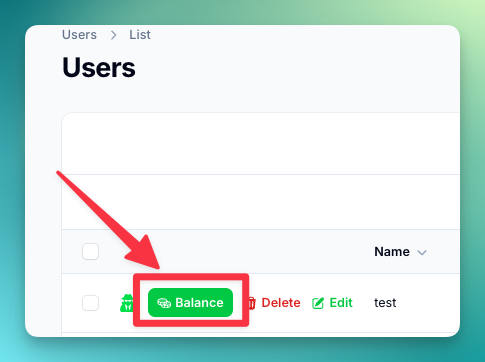 The modal shows both the **user's balance** (minutes and credits) and **your balance** as the platform owner side by side.
### Transfer Call Minutes
Transfer call minutes between your balance and a user's balance.
The modal shows both the **user's balance** (minutes and credits) and **your balance** as the platform owner side by side.
### Transfer Call Minutes
Transfer call minutes between your balance and a user's balance.
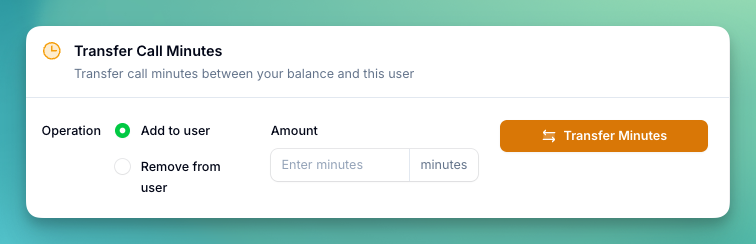 * Choose **Add to user** or **Remove from user**
* Enter the amount in minutes
* The maximum you can transfer is limited by the source balance
### Transfer Chat Credits
Transfer chat credits used for AI replies, WhatsApp messages, and SMS. Credits are deducted from your minutes balance at a rate of **9 credits = 1 minute**.
* Choose **Add to user** or **Remove from user**
* Enter the amount in minutes
* The maximum you can transfer is limited by the source balance
### Transfer Chat Credits
Transfer chat credits used for AI replies, WhatsApp messages, and SMS. Credits are deducted from your minutes balance at a rate of **9 credits = 1 minute**.
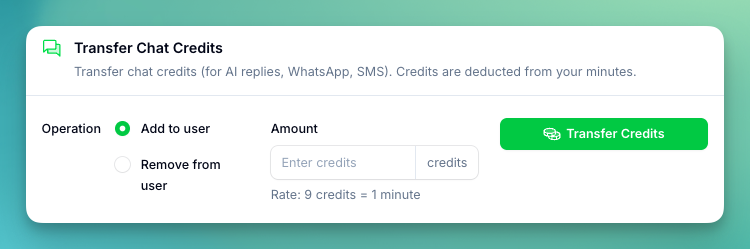 * Choose **Add to user** or **Remove from user**
* Enter the amount in credits
* When adding credits, the equivalent minutes are deducted from your balance
* When removing credits, the equivalent minutes are returned to your balance
## Troubleshooting
**User can't create resources:**
* Check current vs. limit usage
* Verify limit type (count vs. boolean)
* Confirm user is on correct plan
**Limits not applying:**
* Clear platform cache
* Verify limit configuration
* Check for conflicting settings
Unlimited settings (-1) should be used carefully as they can impact platform performance and costs.
User limits override plan limits. A user's effective limit is always the user limit if set, otherwise the plan limit applies.
* Choose **Add to user** or **Remove from user**
* Enter the amount in credits
* When adding credits, the equivalent minutes are deducted from your balance
* When removing credits, the equivalent minutes are returned to your balance
## Troubleshooting
**User can't create resources:**
* Check current vs. limit usage
* Verify limit type (count vs. boolean)
* Confirm user is on correct plan
**Limits not applying:**
* Clear platform cache
* Verify limit configuration
* Check for conflicting settings
Unlimited settings (-1) should be used carefully as they can impact platform performance and costs.
User limits override plan limits. A user's effective limit is always the user limit if set, otherwise the plan limit applies.