> ## Documentation Index
> Fetch the complete documentation index at: https://docs.autocalls.ai/llms.txt
> Use this file to discover all available pages before exploring further.
# Test Chat Interface
> Test your assistant with a text-based chat interface for rapid iteration
The Test Chat interface provides a quick way to test your assistant's conversation flow without making actual phone calls.
## Accessing Test Chat
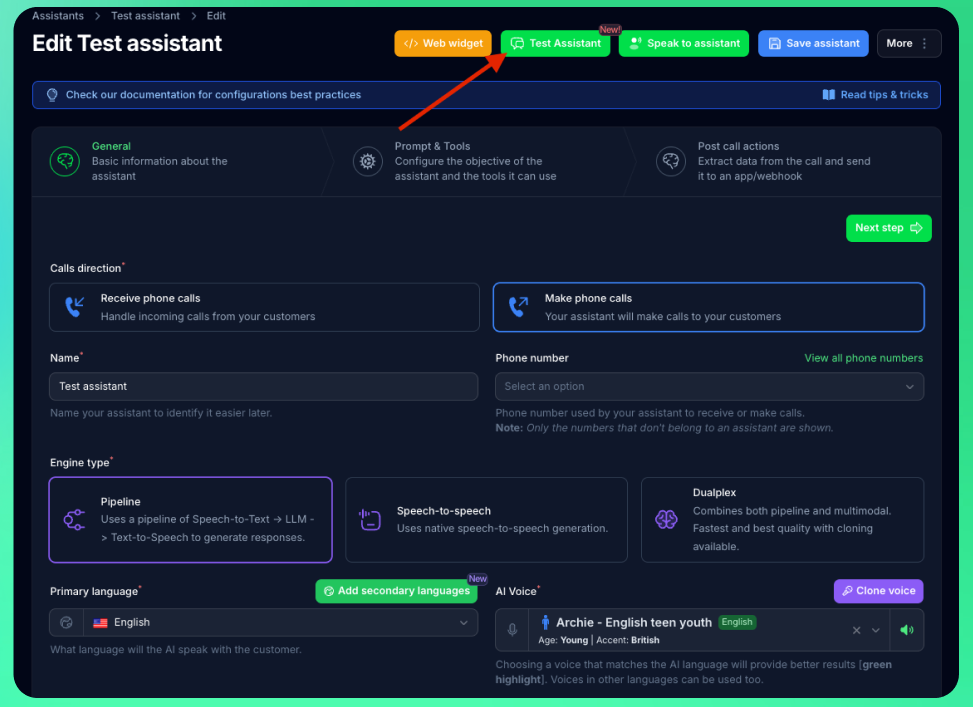
1. Navigate to your assistant's page
2. Click the **"Test Assistant"** button with the chat icon
3. A chat interface will open in a slide-over panel
 ## How It Works
The Test Chat interface simulates a conversation with your assistant:
* **Text-based interaction:** Type messages instead of speaking
* **Real AI responses:** Your assistant processes messages using the same logic as phone calls
* **Variable testing:** Test how your assistant handles variables and data collection
* **Tool execution:** See how your assistant uses configured tools and functions
* **Fast iteration:** Quickly test prompt changes without phone calls
## When to Use Test Chat
**Ideal for:**
* Testing conversation flow and logic
* Verifying prompt behavior and responses
* Debugging variable collection
* Testing tool/function calls
* Rapid prompt iteration
**Not suitable for:**
* Testing voice quality or speech recognition
* Testing call transfers (use phone testing)
* Testing phone-specific features
* Evaluating conversation timing and pacing
## Testing Workflow
**1. Test conversation flow with chat interface:**
* Verify your assistant understands user intents
* Check that variables are collected correctly
* Ensure tools execute as expected
* Validate response quality
**2. Test voice quality with Web Call:**
* Verify voice clarity and tone
* Check response timing and pacing
* Test interruption handling
**3. Final testing with Phone Call:**
* Test all features including call transfers
* Verify real-world call quality
* Test edge cases and error handling
Test Chat creates conversation records that appear in your **Conversations** page, helping you review and analyze test sessions.
## Cost Considerations
Test Chat interactions:
* Use AI processing credits from your account balance
* Are typically more cost-effective than phone testing
* Allow for faster iteration with immediate feedback
* Create conversation records for later review
Use Test Chat for initial prompt development, then move to phone testing for final validation before deploying to production.
## How It Works
The Test Chat interface simulates a conversation with your assistant:
* **Text-based interaction:** Type messages instead of speaking
* **Real AI responses:** Your assistant processes messages using the same logic as phone calls
* **Variable testing:** Test how your assistant handles variables and data collection
* **Tool execution:** See how your assistant uses configured tools and functions
* **Fast iteration:** Quickly test prompt changes without phone calls
## When to Use Test Chat
**Ideal for:**
* Testing conversation flow and logic
* Verifying prompt behavior and responses
* Debugging variable collection
* Testing tool/function calls
* Rapid prompt iteration
**Not suitable for:**
* Testing voice quality or speech recognition
* Testing call transfers (use phone testing)
* Testing phone-specific features
* Evaluating conversation timing and pacing
## Testing Workflow
**1. Test conversation flow with chat interface:**
* Verify your assistant understands user intents
* Check that variables are collected correctly
* Ensure tools execute as expected
* Validate response quality
**2. Test voice quality with Web Call:**
* Verify voice clarity and tone
* Check response timing and pacing
* Test interruption handling
**3. Final testing with Phone Call:**
* Test all features including call transfers
* Verify real-world call quality
* Test edge cases and error handling
Test Chat creates conversation records that appear in your **Conversations** page, helping you review and analyze test sessions.
## Cost Considerations
Test Chat interactions:
* Use AI processing credits from your account balance
* Are typically more cost-effective than phone testing
* Allow for faster iteration with immediate feedback
* Create conversation records for later review
Use Test Chat for initial prompt development, then move to phone testing for final validation before deploying to production.